

• Home
  • Tips, Guides, & Troubleshooting
  • Categories
    • Software & Apps
    • Laptop Computers
    • Desktop Computers
    • Mobile Devices
    • Computer Monitors
    • Graphic Cards
    • Consoles
    • WiFi Devices
  • Product Reviews
  • Download Drivers
    • HP Drivers
    • Dell Drivers
    • Asus Drivers
    • Toshiba Drivers
Facebook Twitter Instagram
Trending
  • Linksys AE6000 WiFi Mini USB Adapter Review
  • How To Fix VCRUNTIME140.dll and MSVCP140.dll missing error in Windows 10
  • Netgear Nighthawk AC1900 WiFi USB Adapter Review
  • How To Fix Microsoft Excel Has Stopped Working Error
  • How To Increase Maximum Upload Limit & PHP Memory in WordPress
  • How To Fix Fonts Are Incomplete Error in Adobe InDesign
  • How To Connect To WiFi With An Android Phone
  • How To Setup Your TP-Link N300 TL-WA855RE WiFi Extender
Facebook Twitter Instagram
New Computer Inquiry
  • Home
  • Tips, Guides, & Troubleshooting
  • Categories
    • Software & Apps
    • Laptop Computers
    • Desktop Computers
    • Mobile Devices
    • Computer Monitors
    • Graphic Cards
    • Consoles
    • WiFi Devices
  • Product Reviews
  • Download Drivers
    • HP Drivers
    • Dell Drivers
    • Asus Drivers
    • Toshiba Drivers
New Computer Inquiry
You are at:Home»Desktops»Choosing The Best Desktop Computers For Your Company
Desktops

Choosing The Best Desktop Computers For Your Company

AndyBy AndySeptember 22, 2014Updated:January 18, 2017No Comments4 Mins Read
desktop computers
  • Share
  • Tweet
  • LinkedIn
  • Email

When it comes to choosing the best desktop computers for your office, you have to first take an overall evaluation of your staff and office environment. Making the right assessment in the beginning will not only save you a lot of time but also money. If you are a new business owner looking to setup a company in a building or large office from scratch, you have to know what the primary functions of your staff are. For example, there are companies that purchase brand new desktop computers for different departments within the company. One department may specialize in sales, one in publishing and another in video/graphic production.

Knowing the functions of each department will allow you to know the best desktop computers to purchase. The sales department would not need any high tech equipment. A computer that utilizes an Intel Core i3 processor would be very sufficient in handling minor tasks such as logging in customer information and creating invoices to be printed, email, or sent via postage. Such tasks would not bog down system resources or slow things up. The low-range or basic computers are perfect for doing non-intensive data tasks. Still powerful enough to do occasional internet browsing which is a plus.

The publishing department would require much stronger desktop computers for their staff because their work usually revolves around doing minor graphic work. Creating documents such as newsletters, flyers, and advertisement both for digital and print require programs such as Adobe Photoshop and Microsoft Publisher to be used. Photoshop itself requires a computer with a sufficient amount of memory and speed in order to function properly. The desktop computers of choice for the publishing department would need mid-range computers. The best computers that are mid-range would have an Intel Core i5 processor or AMD A6/A8 Series which is perfect for tasks that require more power and system resources.

The Options You Should Look for When Choosing the Best Desktop Computers?

The best desktop computers for heavy duty tasks that involve video, graphics, and animation are systems that utilize the Intel Core i7 processor or the AMD A10-Series. These types of computers are considered high-end for a reason because they are built to with-stand system overload. These computers can handle intense video rendering which can take hours. Rendering certain animations could take a few days. With the low-end computer, these tasks would be considered impossible, the computer would simple freeze, lock-up, or give you a program shut-down message that lets you know that your computer is out of memory. With a high-end desktop pc, that would not be the case.

The example above shows you that you can’t just go out purchase computers without prior knowledge of what your departments and staff need. You have to know exactly what to buy when it comes to purchasing the best desktop computers. There are many computer brands to choose from; I listed a few below with details that can help you to make the right choice.

Three Potential Desktop Computer Choice for Your Company
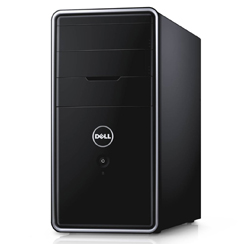
Buy Dell Inspiron 3000

Dell Inspiron 3000 Series (low to mid-range PC)

This desktop PC has a 3.5GHz Intel Core i3 Processor. 8GB DDR3 Memory, 1TB Hard-Drive and Windows 8.1 OS
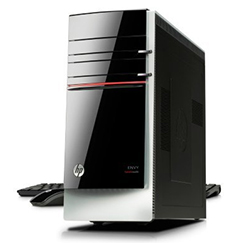
 

Buy HP Envy 700

HP Envy 700-047c (mid to high-end PC)

This desktop PC has an Intel Core i5 Processor. 12GB DDR3 Memory, 2TB Hard-Drive and Windows 8.1 OS
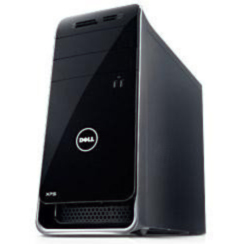
 

purchase dell pc

Dell XPS 8700 (high-end PC)

This desktop PC has a 3.9 GHz Intel Core i7 Quad-Core Processor. 16GB DDR3 Memory, 1TB Hard-Drive and Windows 8


What ever choice you go with make sure it’s the right decision, especially if it’s a computer for you business. Your computer needs to be able to handle specific tasks. Choosing the wrong one could make you lose not only time, but money. Be sure to check out our other PC reviews and also visit our online computer store, we have a great selection of the best desktop computers from all major brands.

best desktop computers Best Desktop PC PC Reviews
Share. Facebook Twitter Pinterest LinkedIn Tumblr Email

Related Posts

Top 10 Desktop Computers for Home, Business, and Gaming

9.5

2020 Edition – Dell XPS 8930 Desktop (8th Gen Intel 6-Core i7-8700) Review

9.2

Cyber Power PC Gamer Xtreme VR 16GB DDR4 Review

Leave A Reply Cancel Reply

  • Recent Posts
  • Top Reviews
9.0
December 25, 2021

Linksys AE6000 WiFi Mini USB Adapter Review

December 21, 2021

How To Fix VCRUNTIME140.dll and MSVCP140.dll missing error in Windows 10

8.5
December 21, 2021

Netgear Nighthawk AC1900 WiFi USB Adapter Review

February 5, 2021

How To Fix Microsoft Excel Has Stopped Working Error

9.9
September 18, 2014

HP Envy 24 24-Inch Screen LED-Lit Monitor With Beats Audio Review

9.9
September 18, 2014

Samsung Galaxy Tab 4 Review

9.9
December 25, 2014

CybertronPC Hellion GM1213B Desktop Review

9.8
September 16, 2014

Dell Inspiron 17R Touchscreen Gaming Laptop 2014 Edition PC Review

9.0
December 25, 2021

Linksys AE6000 WiFi Mini USB Adapter Review

December 21, 2021

How To Fix VCRUNTIME140.dll and MSVCP140.dll missing error in Windows 10

8.5
December 21, 2021

Netgear Nighthawk AC1900 WiFi USB Adapter Review

February 5, 2021

How To Fix Microsoft Excel Has Stopped Working Error

About

New Computer Inquiry was created to provide great reviews and tips that are computer or technology related. We value providing quality information that people can learn and benefit from.

Our staff are all computer experts with professional experience when it comes to Mac and PC based computers, as well as smart phones and video game consoles. Thank you for visiting our website and we look forward to serving you the best content!

Popular Posts
November 23, 2016

How To Setup Your Toyia MSRM US302 300Mbps Wi-Fi Range Extender

July 3, 2017

How To Setup Your NETGEAR Nighthawk AC1750 Smart Dual Band WiFi Router

February 9, 2015

Attaching PDF To Outlook Gets Corrupted Solution

Recent Posts
9.0
December 25, 2021

Linksys AE6000 WiFi Mini USB Adapter Review

December 21, 2021

How To Fix VCRUNTIME140.dll and MSVCP140.dll missing error in Windows 10

8.5
December 21, 2021

Netgear Nighthawk AC1900 WiFi USB Adapter Review

Copyright © 2024 New Computer Inquiry

Type above and press Enter to search. Press Esc to cancel.