

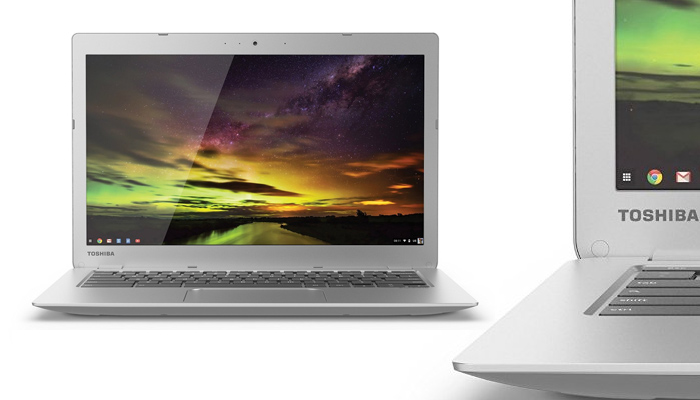
The Toshiba CB35-B3340 Chromebook is a type of computer that has been fashioned for getting tasks done faster while being versatile in function for both work and leisure. Right out of the box, this computer is ready for either work or for play.
It has an ultra-thin design which is about 0.8 inches thick and comes in at only a mere 3 pounds in weight which makes it easy to carry about without a hassle. The screen display size stands at 13. Inches.
Toshiba CB35-B3340 Features
The display is of an optimal 1920 x 1080 pixels screen resolution which show games and movies in HD with great color and clarity aided by the incorporated TruBrite technology improves image quality.
The Toshiba Chromebook 2 has an Intel Celeron 2.16 GHz N2840 with integrated graphics, 2 or 4 GB of random memory, 16 GB of storage with a microSD slot that allows you to expand that capacity to 128 GB more, and of course Wi-Fi connectivity 802.11ac and Bluetooth 4.0.
The RAM on this computer is appropriately high enough to support basic multitasking tasks like running numerous applications at the same time.
Although it offers a smaller amount storage than a regular hard disc drive, the use of a solid state drive results in faster start-up time and quieter operation, lower heat generation and battery power consumption.
CB35-B3340 has a fast Bluetooth 4.0 connection interface which can be readily synchronized with a number of compatible devices, thereby, facilitating the easy transfer of files and other media content wirelessly between the laptop and other Bluetooth-enabled devices such as smartphones, Smart TVs or MP3 players.
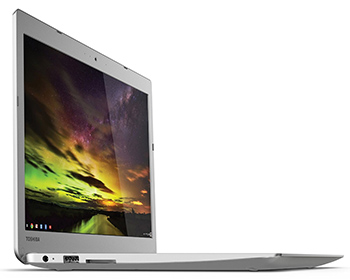
There are also USB 3.0 and USB 2.o connection ports on the product unit. These serve very well when connections need to be made to other compatible peripherals which are not Bluetooth-enabled.
The HDMI output on this computer opens up a wider range of connection options to the user since quick connections can be made through this port to say, HDTV or HD monitor, and then dual screens can be set up to display imagery in a larger size.
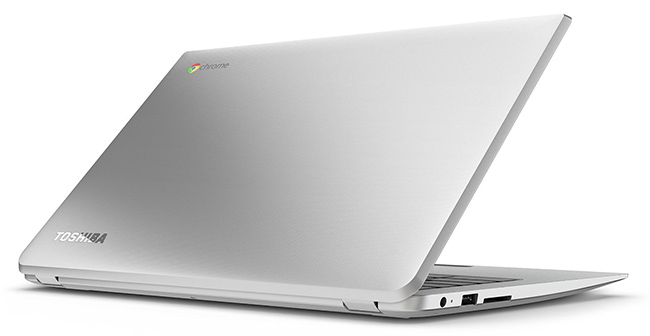
With The Toshiba CB35-B3340 Chromebook, one can get access to a host of media files with the inbuilt media reader. It is so easy to transfer photos, music or any file types of choice onto this computer as it supports a large number of file formats, some of which include miniSD, microSD and SDXC memory card formats, amongst others.
With the installed Google Chrome operating system on this product, automatic downloads and updates to all security features and software applications are done easily as the PC stays up-to-date by itself automatically.
Video conferencing and Skype sessions are with your contacts are possible with the HD web camera and microphone of the PC. Other popular video chatting applications run smoothly on this computer.
The computer’s keyboard has several convenient one-touch function keys which make it very easy to use for any user. The touchpad is fully clickable and supports single finger left clicks, double-finger right clicks, as well as scrolling with two fingers.
There is also one HDMI port, one USB 2.0 and one 3.0 port; all at a weight not more than 3 pounds. Toshiba teamed up with the folks at SkullCandy for the audio speakers installed on this product.

Specifications
- Brand Name – Toshiba
- Series – Toshiba Chromebook 2 CB35-B3340
- Product Model Number – PLM02U-009008
- Operating System Installed – Chrome OS
- Product Weight – 3 pounds
- Shipping Weight – 4.2 pounds
- Product Dimensions – 40 x 0.76 x 12.60 inches
- Colour – Silver
- Processor Brand – Intel
- Processor Count – One
- L2 Cache – 1 MB
- Flash Memory Size – 16.0
- Batteries – Yes (1 Li ion batteries needed, included)
- Number of Cells – 3-cell
- Screen Display Size – 13.3 inches
- Touch screen – Touchpad Keyboard
- Memory Card Supported – SDXC Card, SDHC Card, SD Card, miniSD Card, microSD Card
- Maximum Display Resolution – 1920 x 1080 pixels
- Native aspect ratio – 16 : 9
- Processor Type – 2.16 GHz Intel Celeron
- Random Memory Size – 4 GB DDR3L
- Graphics Processor Type Installed – Intel HD
- Wireless Connectivity – 802.11 a/c
- Number of USB 2.0 Ports – One
- Number of USB 3.0 Ports – One
- Estimated Battery Life – 9 hours
PROS
- It has an HDMI connection port
- It has a good battery life lasting up to 9 hours
- Has a good HD screen display and sizeable RAM
- The booting time is very short
- It is slim, lightweight and portable
CONS
- There is no room for CD/DVD player
Final Verdict
If you need a solid Chromebook with a nice screen display, capable of multitasking and video streaming, the Toshiba CB35-B3340 Chromebook 2 would be a great purchase for you.
The pricing is not at all prohibitive as anyone who won’t compromise on quality will find it to be very affordable indeed.
