
• Home
  • Tips, Guides, & Troubleshooting
  • Categories
    • Software & Apps
    • Laptop Computers
    • Desktop Computers
    • Mobile Devices
    • Computer Monitors
    • Graphic Cards
    • Consoles
    • WiFi Devices
  • Product Reviews
  • Download Drivers
    • HP Drivers
    • Dell Drivers
    • Asus Drivers
    • Toshiba Drivers
Facebook Twitter Instagram
Trending
  • Linksys AE6000 WiFi Mini USB Adapter Review
  • How To Fix VCRUNTIME140.dll and MSVCP140.dll missing error in Windows 10
  • Netgear Nighthawk AC1900 WiFi USB Adapter Review
  • How To Fix Microsoft Excel Has Stopped Working Error
  • How To Increase Maximum Upload Limit & PHP Memory in WordPress
  • How To Fix Fonts Are Incomplete Error in Adobe InDesign
  • How To Connect To WiFi With An Android Phone
  • How To Setup Your TP-Link N300 TL-WA855RE WiFi Extender
Facebook Twitter Instagram
New Computer Inquiry
  • Home
  • Tips, Guides, & Troubleshooting
  • Categories
    • Software & Apps
    • Laptop Computers
    • Desktop Computers
    • Mobile Devices
    • Computer Monitors
    • Graphic Cards
    • Consoles
    • WiFi Devices
  • Product Reviews
  • Download Drivers
    • HP Drivers
    • Dell Drivers
    • Asus Drivers
    • Toshiba Drivers
New Computer Inquiry
You are at:Home»Laptops»Razer Blade 14″ QHD+ Touchscreen Gaming Laptop Review
Laptops

Razer Blade 14″ QHD+ Touchscreen Gaming Laptop Review

AndyBy AndyJune 6, 2015Updated:February 24, 20171 Comment4 Mins Read
Gaming Laptop Computer
  • Share
  • Tweet
  • LinkedIn
  • Email

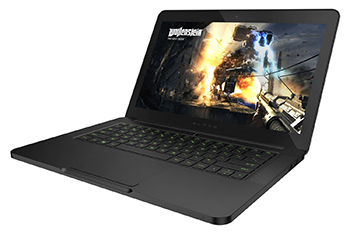
The Razer Blade 14-inch QHD+ touchscreen gaming laptop is a powerful and ultra-thin computer that is very beautiful and pleasant to touch. The finish and quality of the Razer Blade 14-inch QHD+ touchscreen gaming laptop is impeccable. The laptop has a stunning look with a chassis made of smooth black aluminum.

It features a nicely designed QWERTY keyboard with good back-lights. The track pad is accurate and responsive. This laptop boasts of a GPU GeForce GTX 970M series co-processor by Nvidia. This advanced processor has a virtual RAM of 3GB which is responsible for the PC’s lightning-quick performance as well as its much-enhanced power management. This machine will conveniently run any demanding game easily at a native resolution of 1600 × 900 pixels.

Hence, with the Razer Blade QHD+ touchscreen gaming laptop, all of your best computer games will run much faster with zero lag even at ultra-settings.

The touchscreen display has an awesome maximum resolution of 3200 x 1800 pixels. However, one major downside to a resolution of this magnitude is that some apps are too small to display properly as they are not well-adapted to this resolution. The same thing applies to some games because they are a bit difficult to play at this resolution, hence the native screen resolution needs to be lowered accordingly. A resolution of 1920 x 1080 seems to work just right for many of the games I tested.

Razor Blade Gaming Laptop

For the processor, this laptop sports an Intel Core i7-4702 HQ processor with a frequency of 2.6 GHz and a turbo frequency of up to 3.6 GHz. This is coupled with its 16 GB of RAM with a clock speed of 1600 MHz.

The computer unit has different connectors ranging from USB ports to HDMI output jack. The computer is fitted with green anti-ghosting keyboard with adjustable back-light settings and 10 adaptive tactile keys.

Specifications

  • Name of Brand– Razer Blade
  • Model number – RZ09-01301E21-R3U1
  • Operating System Installed – Windows 8.1
  • Product Weight (pounds) – 4.5
  • Product Dimensions – 0.7 x 9.30 x 13.60 inches
  • Processor – Intel Core i7-4720HQ (2.6 GHz)
  • Size of RAM – 16 GB DDR3L SDRAM
  • Graphics Co-processor – NVIDIA GeForce GTX 970M
  • Size of Graphics Card Ram– 3 GB
  • Wireless Technology Type- 802.11a / b / g / n / ac + Bluetooth 4.0
  • Number of USB Ports – 3
  • Screen Size – 14 inches
  • Maximum Screen Resolution – 3200 x 1800 pixels

best computer reviews

PROS

  • The screen resolution is quite impressive at 3200 x 1800 pixels
  • The finishing of the PC is very good and durable
  • It is light in weight which aids portability
  • It comes with the all-powerful Nvidia GeForce GTX 970M graphics card which confers great speed and solid performance when in use

CONS

  • This PC is rather expensive, even for a gaming laptop as its selling price is usually over $2,100
  • The battery of this computer does not last very long which is disappointing for a computer of this price
  • The cooling system of this PC is a little suspect as the computer unit gets heated up rather quickly
  • The functionality of some applications is hampered by the screen’s resolution which compels the user to adjust it appropriately
  • The audio output from the integrated speakers is not very loud
 

touchscreen gaming laptopFinal Verdict

Conclusively, I would say that the new Razer Blade is suitable for gamers looking for something portable and yet powerful enough to play resource-intensive games at high resolutions.

However, it must be stated here that, although there are cheaper computers of similar configuration, few of them are more powerful than the Razer Blade 14-inch QHD+ touchscreen gaming laptop.

buy now

Razer Blade Computer Razor Blade Razor Blade Laptop Razor Blade PC
Share. Facebook Twitter Pinterest LinkedIn Tumblr Email

Related Posts

9.0

Linksys AE6000 WiFi Mini USB Adapter Review

8.5

Netgear Nighthawk AC1900 WiFi USB Adapter Review

9.5

2020 Edition – Dell XPS 8930 Desktop (8th Gen Intel 6-Core i7-8700) Review

1 Comment

  1. Rufus on June 9, 2015 7:38 am

    It was between this monitor and Alienware. I had to go with the razor because its a powerful machine at a much better price. Truly a great gaming machine

    Reply

Leave A Reply Cancel Reply

  • Recent Posts
  • Top Reviews
9.0
December 25, 2021

Linksys AE6000 WiFi Mini USB Adapter Review

December 21, 2021

How To Fix VCRUNTIME140.dll and MSVCP140.dll missing error in Windows 10

8.5
December 21, 2021

Netgear Nighthawk AC1900 WiFi USB Adapter Review

February 5, 2021

How To Fix Microsoft Excel Has Stopped Working Error

9.9
September 18, 2014

HP Envy 24 24-Inch Screen LED-Lit Monitor With Beats Audio Review

9.9
September 18, 2014

Samsung Galaxy Tab 4 Review

9.9
December 25, 2014

CybertronPC Hellion GM1213B Desktop Review

9.8
September 16, 2014

Dell Inspiron 17R Touchscreen Gaming Laptop 2014 Edition PC Review

9.0
December 25, 2021

Linksys AE6000 WiFi Mini USB Adapter Review

December 21, 2021

How To Fix VCRUNTIME140.dll and MSVCP140.dll missing error in Windows 10

8.5
December 21, 2021

Netgear Nighthawk AC1900 WiFi USB Adapter Review

February 5, 2021

How To Fix Microsoft Excel Has Stopped Working Error

About

New Computer Inquiry was created to provide great reviews and tips that are computer or technology related. We value providing quality information that people can learn and benefit from.

Our staff are all computer experts with professional experience when it comes to Mac and PC based computers, as well as smart phones and video game consoles. Thank you for visiting our website and we look forward to serving you the best content!

Popular Posts
November 23, 2016

How To Setup Your Toyia MSRM US302 300Mbps Wi-Fi Range Extender

July 3, 2017

How To Setup Your NETGEAR Nighthawk AC1750 Smart Dual Band WiFi Router

February 9, 2015

Attaching PDF To Outlook Gets Corrupted Solution

Recent Posts
9.0
December 25, 2021

Linksys AE6000 WiFi Mini USB Adapter Review

December 21, 2021

How To Fix VCRUNTIME140.dll and MSVCP140.dll missing error in Windows 10

8.5
December 21, 2021

Netgear Nighthawk AC1900 WiFi USB Adapter Review

Copyright © 2024 New Computer Inquiry

Type above and press Enter to search. Press Esc to cancel.