

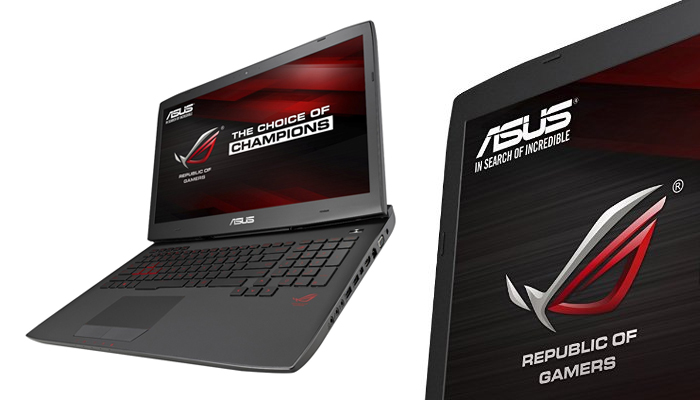
The ASUS ROG G751JY-DH71 is a 4K-friendly laptop equipped with the latest mobile graphics card and it comes shipped in a 17-inch box. It combines a high-end Core i7 CPU, an amazing 24GB of RAM, an SSD of 256GB, a 1TB hard drive of 7200 rpm, and to top it all, the new GeForce 980M graphics card from Nvidia.
The actual monitor screen display on the G751JY is a standard 17.3-inch with a maximum resolution of 1,920 by 1,080 pixels and it is not even a touch screen monitor.
For gamers not willing to spend additional thousands of dollars on a more advanced gaming desktop, the ASUS ROG G751JY-DH71 gaming laptop is as advanced as any top-level gaming laptop available on the market right now.
Specifications
- Brand Name – Asus
- Item model number – G751JY-DH71
- Processor – Intel Core i7 (2.5 Gigahertz)
- Random Access Memory – 24 GB DDR3
- Hard Drive Size- 1024 GB (Serial ATA)
- Graphics Co-processor Specification – NVIDIA GeForce GTX 980M
- Operating System Version – Windows 8.1
- Screen Size – 17.3 inches
- Screen Resolution – 1920 x 1080
- Product Weight – 8.4 pounds
- Product Dimensions – 16.40 x 1.70 X 12.50 inches
- Colour – Black
- Processor Brand Name – Intel
- Number of processors – 4
- Type of Computer Memory – DDR3 SDRAM
- Hard Disk Speed – 7200 RPM
- Type of Optical Drive – Blu-ray Writer
- Number of Audio-out Ports Present – 2
- Number of USB 3.0 Ports – 4
- Wireless Type – 802.11 A/C


Features
The laptop is slightly thinner than some of the other high-end gaming laptops machines in the Republic of Gamers range produced by Asus, but it is not as slim as some of the new aesthetic gaming laptops being manufactured by other PC companies.
Apparently, in making the choice of performance over aesthetics, Asus opted for performance over a slim, ultra book-like body for the ASUS ROG G751JY-DH71 laptop.
One distinct feature of this laptop is the fact that its chassis extends to the back of the laptop and tapers towards the front, thus giving the illusion of a slimmer laptop when viewed from the specific angles. The decor of the machine is minimal, but the matte black lid is half covered by a brushed metal plate.
The lid is accented by a chrome ASUS logo and a red back-lit logo of an arched eyebrow symbolizing the company.
The base of the PC is so big that the screen is overlaid by a few inches, leaving a heavy lip protruding from the rear when the notebook is opened. This protrusion houses the rear double ventilation vents which are highlighted in red.
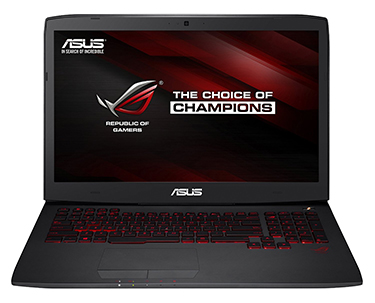
It has a matte black back-lit keyboard whose keys make a deep click when clicked, and the space-bar is skewed slightly to the left, presumably to make it easier to hit with your left hand while playing your favorite games.
A few quick launch and custom programmed keys are positioned above the keyboard on the left side. Also present is the all-too familiar logo of Steam which is a well-known game distribution platform.
The laptop has a software application known as the Gaming Center installed in it. This lists all the available storage space on the computer and allows user profiles with custom macros or screen or audio pre-sets to be done.
The large touch-pad has separate left and right mouse buttons. However, it is very unlikely that gamers will use the touch-pad often as PC gaming is done mostly with the use of a mouse or joystick.
The display is a key factor for any gaming laptop game and this PC comes with a 1,920 x 1,080 resolution, which is still the standard for PC games. The non-glare finish on the screen is also a welcome inclusion, and because it’s an IPS screen (in-plane switching), it looks good when it is viewed at off-angles.
PROS
- It has an aesthetically appealing design
- Comes with a gamer-friendly keyboard and touch-pad both suitable for gaming
- It has a fast boot up time
- It has advanced cooling systems which let it run at cool temperatures when in use
CONS
- It is very pricey
- The integrated audio system is not impressive for a PC of this price range
- The keyboard can be a bit hard to read whenever the back-lights are off
Final Verdict
The ASUS G751JY gaming laptop gives a solid performance every time with its Nvidia Maxwell graphics card and fast-booting SSDs. It is well worth its selling price.

2 Comments
Good review thanks.
Having a large monitor with quick response time, high contrast ration and full 1080p video enhances that experience.
Most standard design gaming cards tend to have only one small fan when they are first introduced.