
• Home
  • Tips, Guides, & Troubleshooting
  • Categories
    • Software & Apps
    • Laptop Computers
    • Desktop Computers
    • Mobile Devices
    • Computer Monitors
    • Graphic Cards
    • Consoles
    • WiFi Devices
  • Product Reviews
  • Download Drivers
    • HP Drivers
    • Dell Drivers
    • Asus Drivers
    • Toshiba Drivers
Facebook Twitter Instagram
Trending
  • Linksys AE6000 WiFi Mini USB Adapter Review
  • How To Fix VCRUNTIME140.dll and MSVCP140.dll missing error in Windows 10
  • Netgear Nighthawk AC1900 WiFi USB Adapter Review
  • How To Fix Microsoft Excel Has Stopped Working Error
  • How To Increase Maximum Upload Limit & PHP Memory in WordPress
  • How To Fix Fonts Are Incomplete Error in Adobe InDesign
  • How To Connect To WiFi With An Android Phone
  • How To Setup Your TP-Link N300 TL-WA855RE WiFi Extender
Facebook Twitter Instagram
New Computer Inquiry
  • Home
  • Tips, Guides, & Troubleshooting
  • Categories
    • Software & Apps
    • Laptop Computers
    • Desktop Computers
    • Mobile Devices
    • Computer Monitors
    • Graphic Cards
    • Consoles
    • WiFi Devices
  • Product Reviews
  • Download Drivers
    • HP Drivers
    • Dell Drivers
    • Asus Drivers
    • Toshiba Drivers
New Computer Inquiry
You are at:Home»Tips & Guides»Bitcoin»How To Use Binance Exchange To Trade Crypto Currencies
Bitcoin

How To Use Binance Exchange To Trade Crypto Currencies

AndyBy AndyJune 26, 2018No Comments3 Mins Read
Hoto to use binance exchange
  • Share
  • Tweet
  • LinkedIn
  • Email

If you are looking for a platform that is secure, stable, and reliable when it comes to crypto currencies then Binance Exchange is your platform. Binance’s sole purpose is to provide you with the best platform for exchanging your favorite crypto currencies such as Bitcoin (BTC), Ethereum (ETH), and Ripple (XRP). Newer cryptos are always being unleashed into the market, Binance Exchange only hosts the most stable ones on their platform.

Using Binance Exchange Platform

Using the Binance platform is fairly simple. Our guide below will help you to quickly get started with trading crypto currencies.

  1. First thing you will need is some Bitcoin. You can purchase Bitcoin using a reliable platform such as Coinbase. Coinbase will allow you to use a credit card, debit card, or PayPal account to convert cash into Bitcoin.
  2. Once you have Bitcoin in your Wallet (on Coinbase), it’s now time to Sign-up to Binance.
  3. After completing the sign-up process, log into your Binance account, at the top right menu (next to News), their is a person shaped icon/avatar, mouse over it and click on the field called “Estimated Value”.
  4. You will see a complete list of available crypto currencies on the platform. Locate Bitcoin by typing in BTC in the search field. Click on the “Deposit” button.
  5. Locate the BTC Deposit Address and click on “Copy Address”.
  6. Head back over to Coinbase and click on the “Accounts” tab. Then Click on the “Send” button.
  7. Paste your BTC Address (from Binance) into the Recipient Field (on Coinbase). Enter the amount of money you would like to transfer, then click on “Continue”.
  8. Bitcoin transfers can take anywhere from 15 minutes to an hour so keep that in mind.
  9. Go back to your Binance tab and see if your deposit from Coinbase came through. After seeing your BTC balance updated, it is time to start using the platform to exchange to other crypto currencies.
  10. To exchange BTC into LTC (Litcoin for example), Mouse over on the “Exchange” button located at the top left of the page, from the drop-down, click on “Basic”.
  11. You will see the exchange platform in action. Towards the right side, you will see a list of crypto currencies. Example would be ADA/BTC. Since for this example we are looking to exchange Litecoin (LTC), locate LTC/BTC and select it.
  12. Towards the middle/bottom of the page you will see a field that allows you to Buy LTC with your available Bitcoin (BTC). In the amount field, type in either a whole number or a decimal number (.01). Once you have the value you want, click on “Buy LTC”.
  13. To view your newly acquired crypto currency, mouse over on the person/avatar icon and click on “Estimated Value”.
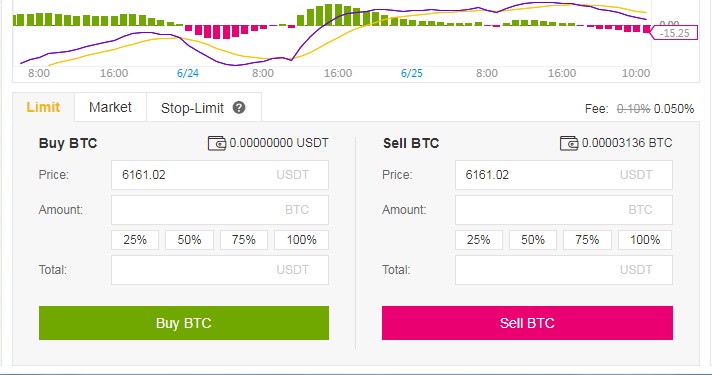
using binance exchange

Conclusion

In a nutshell, this is how you use the Binance Exchange platform. You fund your account with Bitcoin first then proceed to exchange Bitcoin into any of the hundreds of available crypto currencies on the platform. Each crypto currency has it’s own use.

Bitcoin is widely accepted for eCommerce stores and growing in usage value in physical stores. Other cryptos are used on very specific platforms such as for gaming, music, technology etc. Having accessibility to other currencies can be very beneficial depending on their specific use. You can learn more on how to use Bitcoin from our tip & tutorials section.

Binance Exchange Bitcoin Crypto Currencies
Share. Facebook Twitter Pinterest LinkedIn Tumblr Email

Related Posts

How To Fix VCRUNTIME140.dll and MSVCP140.dll missing error in Windows 10

How To Fix Microsoft Excel Has Stopped Working Error

How To Increase Maximum Upload Limit & PHP Memory in WordPress

Leave A Reply Cancel Reply

  • Recent Posts
  • Top Reviews
9.0
December 25, 2021

Linksys AE6000 WiFi Mini USB Adapter Review

December 21, 2021

How To Fix VCRUNTIME140.dll and MSVCP140.dll missing error in Windows 10

8.5
December 21, 2021

Netgear Nighthawk AC1900 WiFi USB Adapter Review

February 5, 2021

How To Fix Microsoft Excel Has Stopped Working Error

9.9
September 18, 2014

HP Envy 24 24-Inch Screen LED-Lit Monitor With Beats Audio Review

9.9
September 18, 2014

Samsung Galaxy Tab 4 Review

9.9
December 25, 2014

CybertronPC Hellion GM1213B Desktop Review

9.8
September 16, 2014

Dell Inspiron 17R Touchscreen Gaming Laptop 2014 Edition PC Review

9.0
December 25, 2021

Linksys AE6000 WiFi Mini USB Adapter Review

December 21, 2021

How To Fix VCRUNTIME140.dll and MSVCP140.dll missing error in Windows 10

8.5
December 21, 2021

Netgear Nighthawk AC1900 WiFi USB Adapter Review

February 5, 2021

How To Fix Microsoft Excel Has Stopped Working Error

About

New Computer Inquiry was created to provide great reviews and tips that are computer or technology related. We value providing quality information that people can learn and benefit from.

Our staff are all computer experts with professional experience when it comes to Mac and PC based computers, as well as smart phones and video game consoles. Thank you for visiting our website and we look forward to serving you the best content!

Popular Posts
November 23, 2016

How To Setup Your Toyia MSRM US302 300Mbps Wi-Fi Range Extender

July 3, 2017

How To Setup Your NETGEAR Nighthawk AC1750 Smart Dual Band WiFi Router

February 9, 2015

Attaching PDF To Outlook Gets Corrupted Solution

Recent Posts
9.0
December 25, 2021

Linksys AE6000 WiFi Mini USB Adapter Review

December 21, 2021

How To Fix VCRUNTIME140.dll and MSVCP140.dll missing error in Windows 10

8.5
December 21, 2021

Netgear Nighthawk AC1900 WiFi USB Adapter Review

Copyright © 2024 New Computer Inquiry

Type above and press Enter to search. Press Esc to cancel.